

EU VAT on cross-border sales depends on who buys. A business with an active EU VAT number buys without VAT and accounts for the tax in its own country (reverse charge), while a consumer pays VAT — usually at your rate, and at the rate of their own country for digital products and for distance sales above EUR 10,000 a year. The condition for a VAT-free sale is a customer VAT number confirmed in the EU VIES register, and PrestaShop does not check VAT numbers on its own. Below we explain how VAT works in the EU, how PrestaShop calculates it and how to set up VIES VAT number validation step by step with the EU VAT Validation module.
How does VAT work in the EU?
VAT is a tax on consumption. Businesses along the supply chain deduct the VAT they pay on purchases, so the final consumer carries the tax. The common rules for the whole Union are set by Council Directive 2006/112/EC (the VAT Directive) and written into the national law of each member state. Each country sets its own rates; the Directive only requires a standard rate of at least 15% (Article 97).
| Country | Standard VAT rate |
|---|---|
| Germany | 19% |
| France | 20% |
| Poland | 23% |
| Hungary | 27% (highest in the EU) |
| Luxembourg | 17% (lowest in the EU) |
The European Commission publishes the current rates of every country, reduced rates included, in the TEDB database.
A business that trades with other EU countries has an EU VAT number: a country prefix followed by the national number, for example DE + 9 digits, FR + 11 characters or PL + 10 digits. What counts is an active registration for intra-EU transactions, and that is exactly what VIES confirms — in some countries a domestic tax number alone is not enough.
When to charge VAT and when to reverse charge
Whether you add VAT, and at which rate, depends on three things: who the customer is (business or consumer), where they are and what you sell. The table shows the typical cases for an online shop based in the EU. These are general rules, not tax advice — check your own situation with your accountant.
| Customer | Digital products and electronic services | Goods shipped to the customer |
|---|---|---|
| Business in another EU country with a valid VAT number | no VAT — reverse charge, the customer accounts for VAT | no VAT — exempt intra-Community supply of goods |
| Consumer, or a business without a valid number, in another EU country | VAT of the customer's country (OSS); up to EUR 10,000 a year you may charge your own VAT | your VAT up to EUR 10,000 of EU distance sales a year, then the customer's country VAT (OSS) |
| Customer from your own country, VAT-registered businesses included | your VAT | your VAT |
Business with a valid EU VAT number: reverse charge
For services to a business in another EU country, the place of supply is the customer's country (Article 44 of the Directive) and the customer pays the VAT (Article 196). You issue an invoice without VAT, with both VAT numbers and the words "Reverse charge" (Article 226), and report the sale in your recapitulative statement, also called the EC Sales List (Article 262). The customer adds VAT at their own rate in their return and usually deducts it at the same time.
For goods sent to a business in another EU country, the sale is an exempt intra-Community supply (Article 138). Since 2020 the exemption requires the customer's valid VAT number and the supply in your recapitulative statement, plus proof that the goods left your country.
Consumers: your VAT or theirs
Consumers — and businesses that did not give a valid number — pay VAT. Since 1 July 2021 a single EU-wide threshold of EUR 10,000 a year, excluding VAT, applies to distance sales of goods and to electronic services for consumers in other EU countries, counted for all countries together in the current and the previous year. Below it you may charge your own VAT. Above it you charge the VAT of the customer's country and declare it in one quarterly return in your own country through the One Stop Shop (OSS), without registering in every country. Downloads, licences and subscriptions sold to consumers are electronic services, taxed in principle in the customer's country.
Customers from your own country
The reverse charge for EU sales is about cross-border transactions. A business from your own country pays your VAT like any domestic customer: a VAT number from your country never removes the tax.
If you are not VAT registered
Small businesses under a national VAT exemption do not charge VAT to their customers. Services to businesses in other EU countries and services bought from abroad (advertising from Google or Meta, for example) usually still require an EU VAT number. Since 1 January 2025 small businesses can also use the exemption in other EU countries under Directive 2020/285, after a separate notification.
VIES VAT number validation
VIES (VAT Information Exchange System) is the European Commission's search service that asks the register of a member state whether a VAT number is active for intra-EU transactions and usually returns the name and address of the business. A check is free, on the VIES website or through its API.
Why does it matter so much? Under Article 18 of Implementing Regulation 282/2011, a supplier may treat a customer as a taxable person — and not charge VAT — when the customer has given a VAT number and the supplier has obtained confirmation of its validity. A typed number is not enough: it may be inactive, mistyped or belong to another company. If you sell without VAT on an invalid number, the tax office can claim the VAT from you.
- Proof of the check — when you send your own VAT number with the request, VIES returns a consultation number that proves the number was checked on that day. Keep it with the order.
- Outages — national systems have maintenance windows, and VIES rejects requests when it is overloaded. Your shop must not block orders or change prices in the middle of checkout when that happens.
- Freshness — a number that was valid last year may have been deregistered. Check it when the customer orders, not once when the account is created.
How does PrestaShop calculate VAT?
PrestaShop calculates tax from the tax rules assigned to products, by the country of the customer's address. These settings matter for EU sales:
- Tax rules (International → Taxes → Tax Rules) — a tax rules group sets the rate for each country. A localization pack (International → Localization) creates, among others, the "EU VAT For Virtual Products" group with the rates of every EU country for digital products.
- Tax address — in International → Taxes, "Based on" picks the delivery address or the invoice address.
- VAT number field — customers can only type a number when the address format of their country contains
vat_number(International → Locations → Countries). - B2B mode (Shop Parameters → Customer Settings → Enable B2B mode) adds company details to customer accounts but does not change the tax.
- Customer groups with the "Tax excluded" price display method (Customers → Groups) show prices without VAT, but VAT is still added to the order.
What is missing? PrestaShop does not validate VAT numbers. All that is left in the code is a mechanism from the old "vatnumber" module (the VATNUMBER_MANAGEMENT setting) that removes VAT for every address with a VAT number from outside the shop's country — without any check. A comment in the PrestaShop 9 code says it plainly: "No validation". A typo or an invented number means a sale without VAT that the tax office can challenge.
The missing link — checking the number in VIES and passing the result to the tax calculation — is what our EU VAT Validation (VIES) module adds. It works with PrestaShop 1.7.8, 8 and 9 (PHP 7.2.5 or later), with the Classic and Hummingbird themes and in multistore.
Reverse charge in PrestaShop step by step
The module works inside PrestaShop's own tax calculation: when the customer's address has a VAT number confirmed in VIES, and its country is in the EU but is not your country, the shop applies 0% to products, shipping and gift wrapping. Prices, totals and invoices follow, and your tax rules stay unchanged. The setup takes a few minutes.
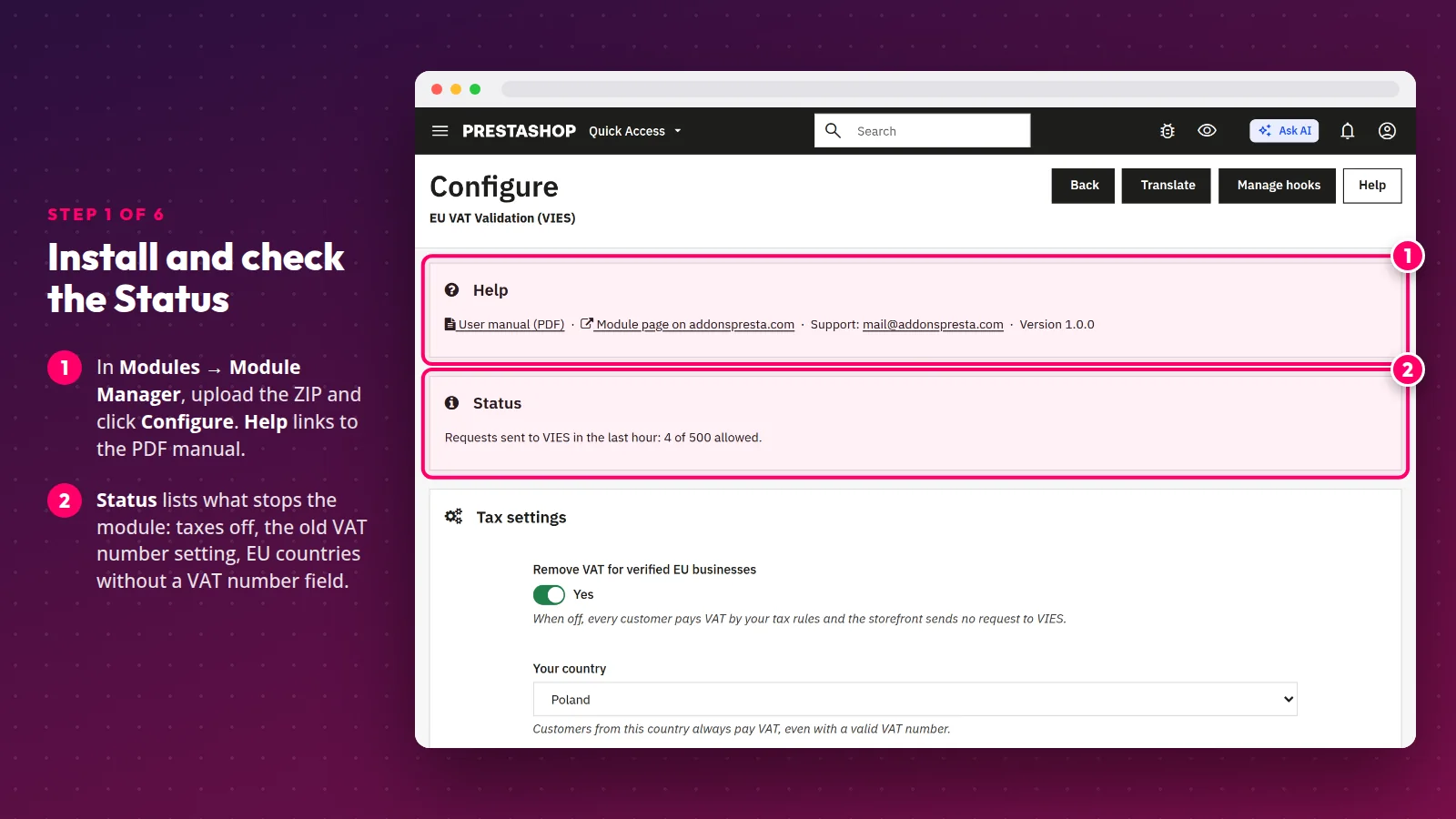
Step 1. Install the module and check the Status
Upload the ZIP in Modules → Module Manager → Upload a module and click Configure. The Status box at the top lists what gets in the module's way: taxes switched off, the old VATNUMBER_MANAGEMENT setting (one click turns it off) or active EU countries without a VAT number field.
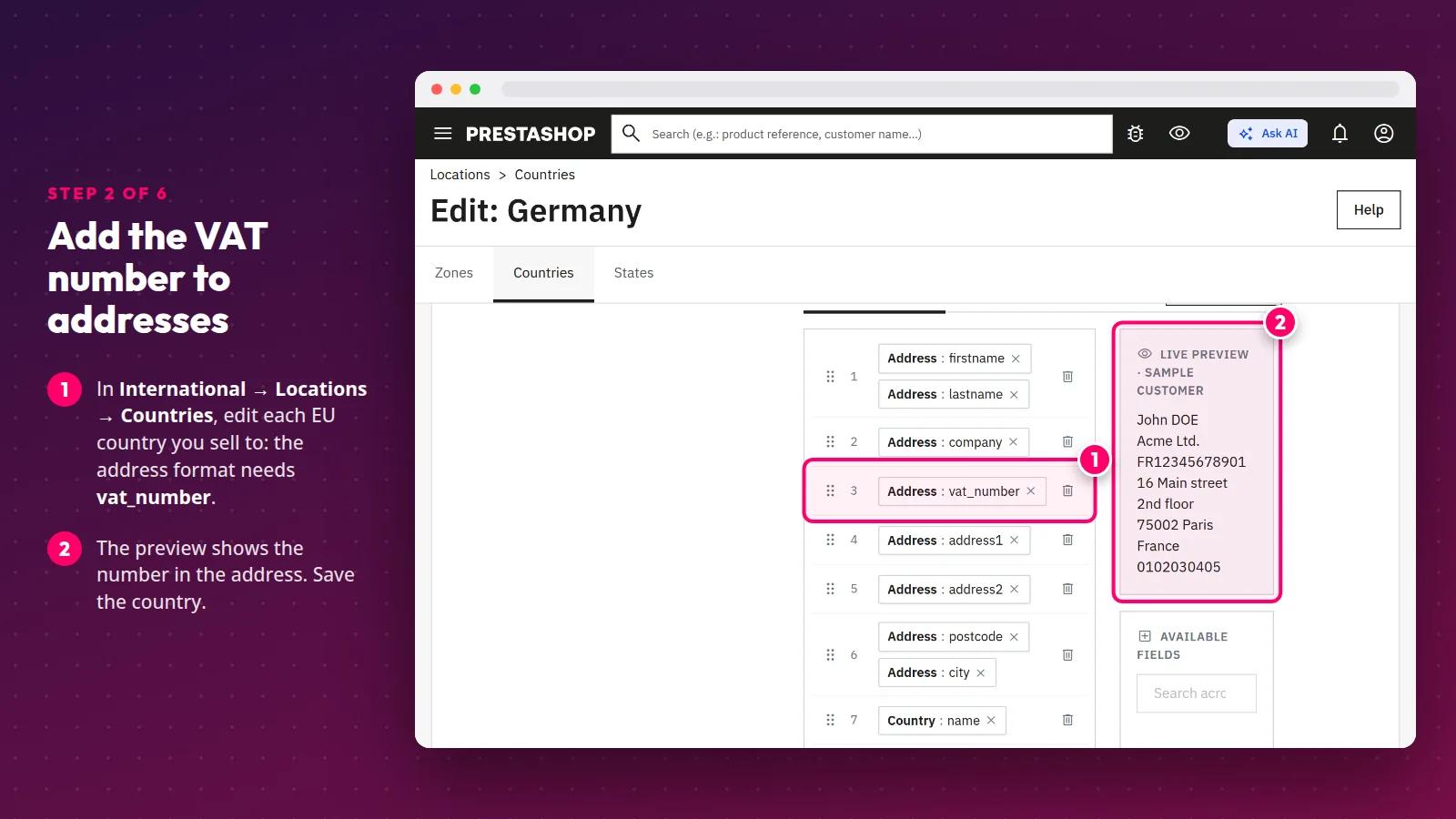
Step 2. Add the VAT number to addresses
In International → Locations → Countries, edit each EU country you sell to and make sure its address format contains vat_number. Without the field, customers have nowhere to type their number.
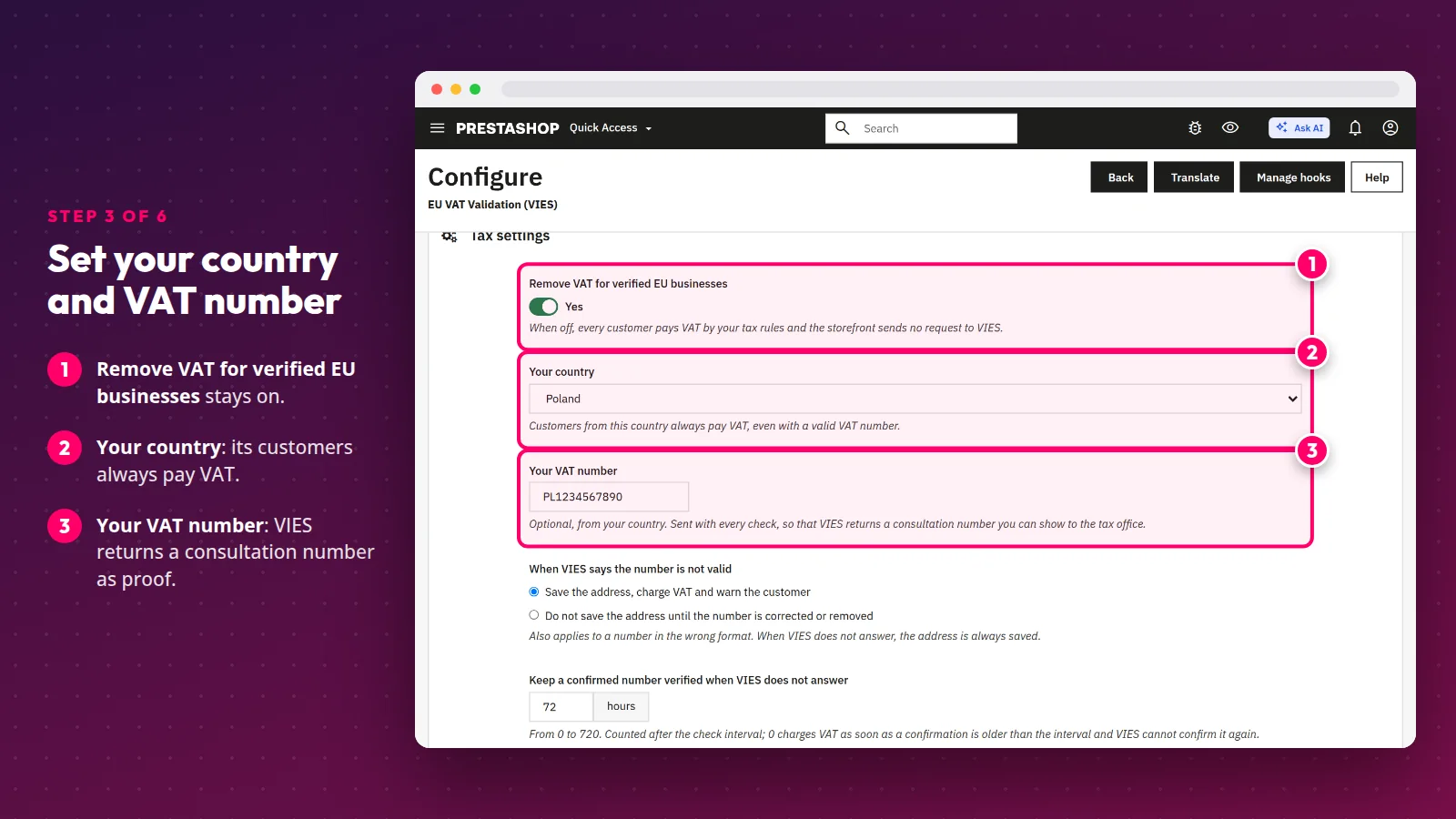
Step 3. Set your country, VAT number and invoices
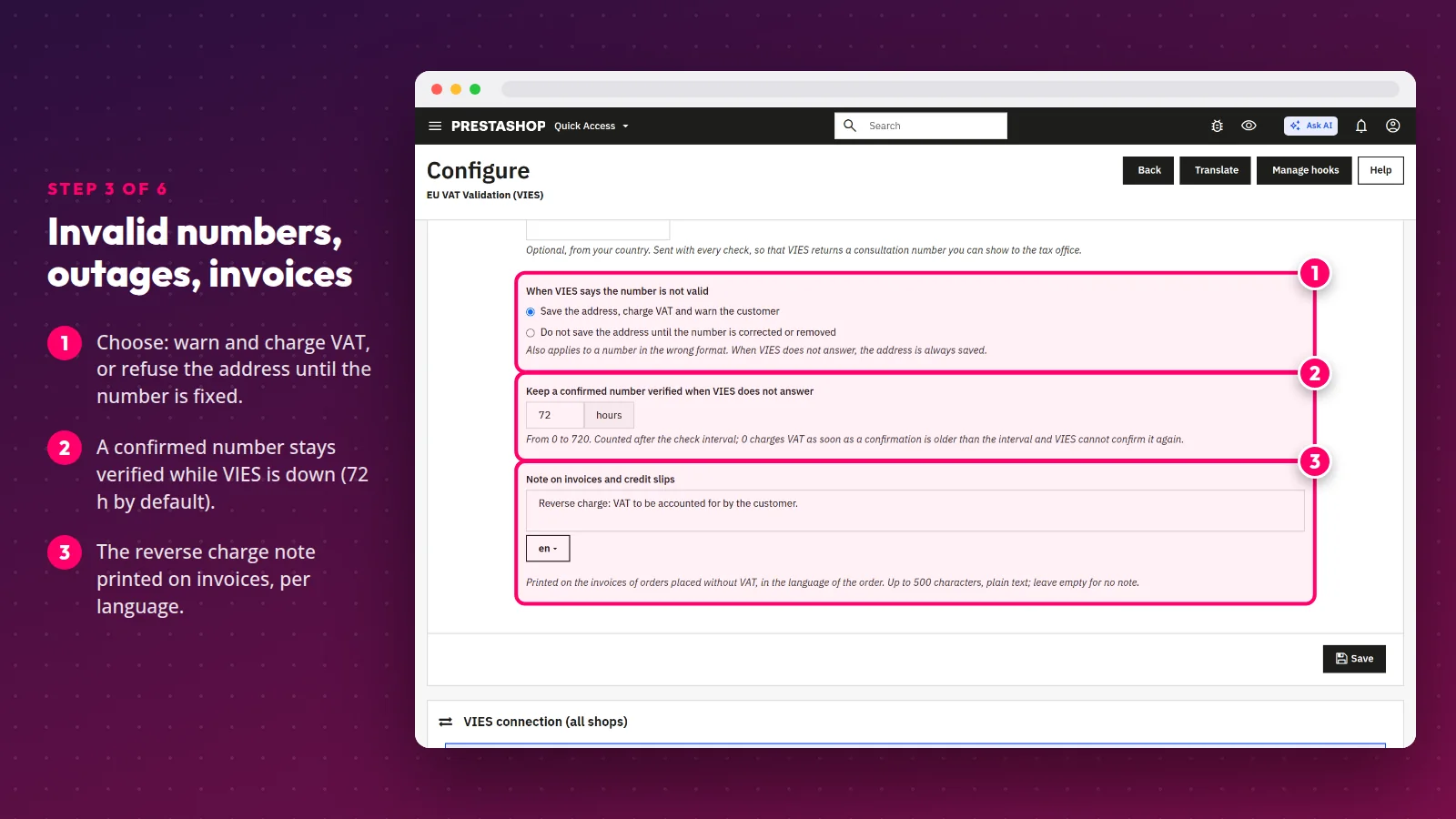
In Tax settings, choose Your country — its customers always pay VAT. Enter Your VAT number so that VIES returns a consultation number with every check. Then decide what happens with an invalid number: save the address, charge VAT and warn the customer, or refuse the address until it is corrected.
The grace period (72 hours by default) keeps a previously confirmed number verified while VIES is down. The note on invoices and credit slips is set per language — by default "Reverse charge: VAT to be accounted for by the customer." Add whatever your accountant recommends, such as the article of the Directive.
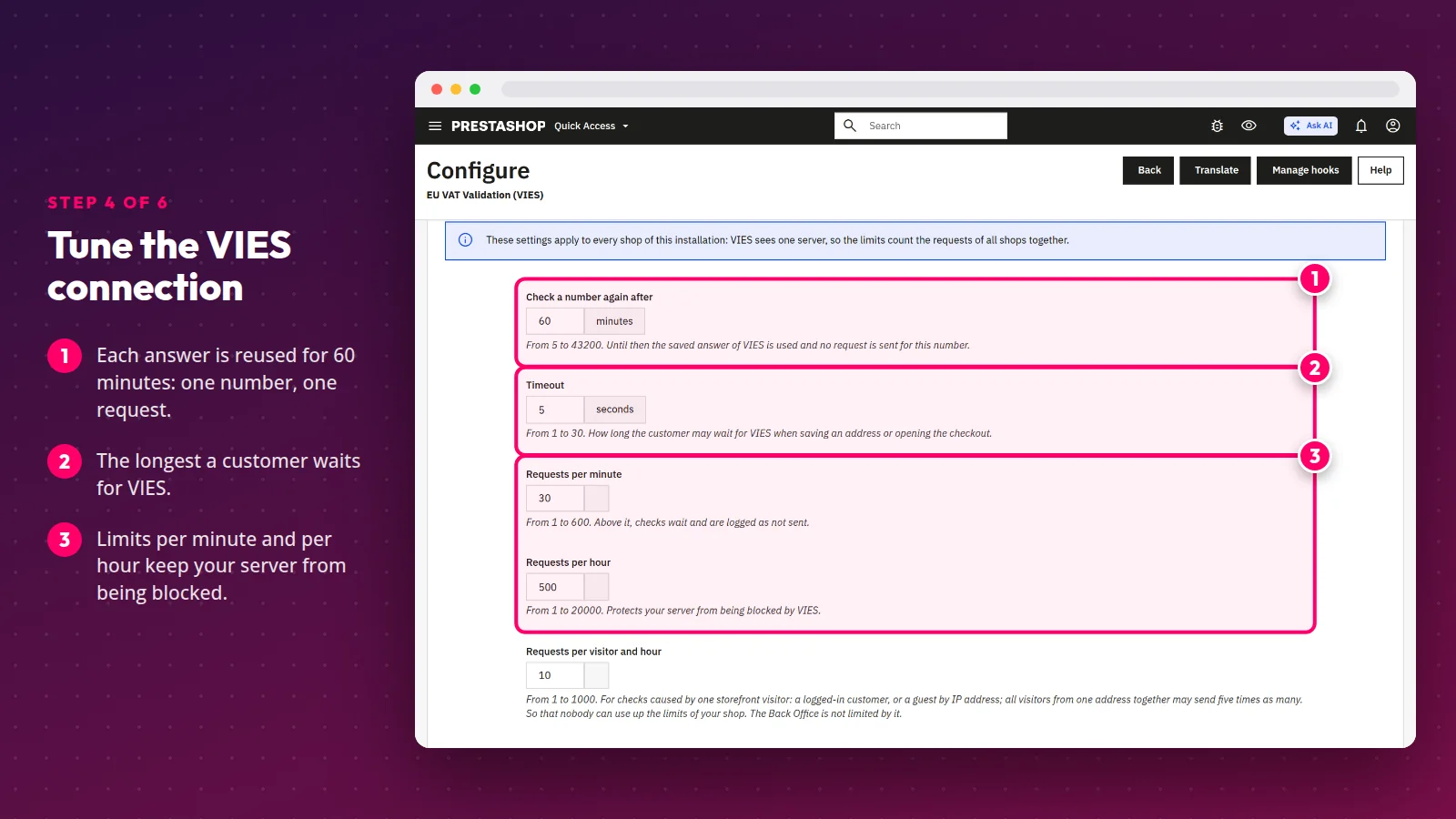
Step 4. Tune the VIES connection
Every VIES answer is saved and reused during the check interval (60 minutes by default), so the module asks about the same number at most once in that time. The timeout is the longest a customer waits for VIES, and the limits per minute, per hour and per visitor protect your server from being blocked. For tests there is a test mode with the VIES test service: number 100 is valid, 200 is not.
Step 5. See what the customer sees
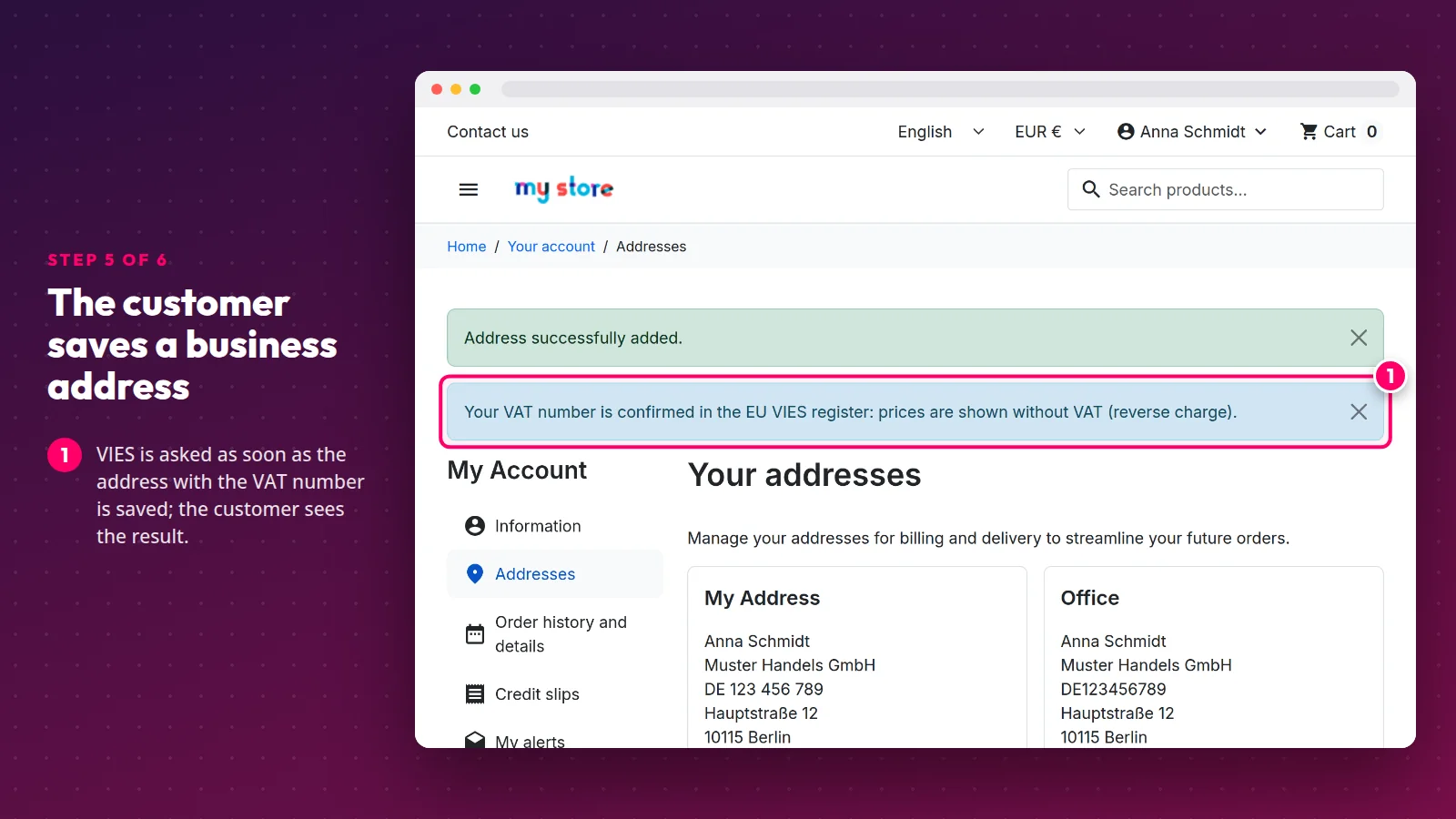
The number is checked when the customer saves an address, in the account or at checkout. Once VIES confirms it, the customer sees a message that prices are shown without VAT.
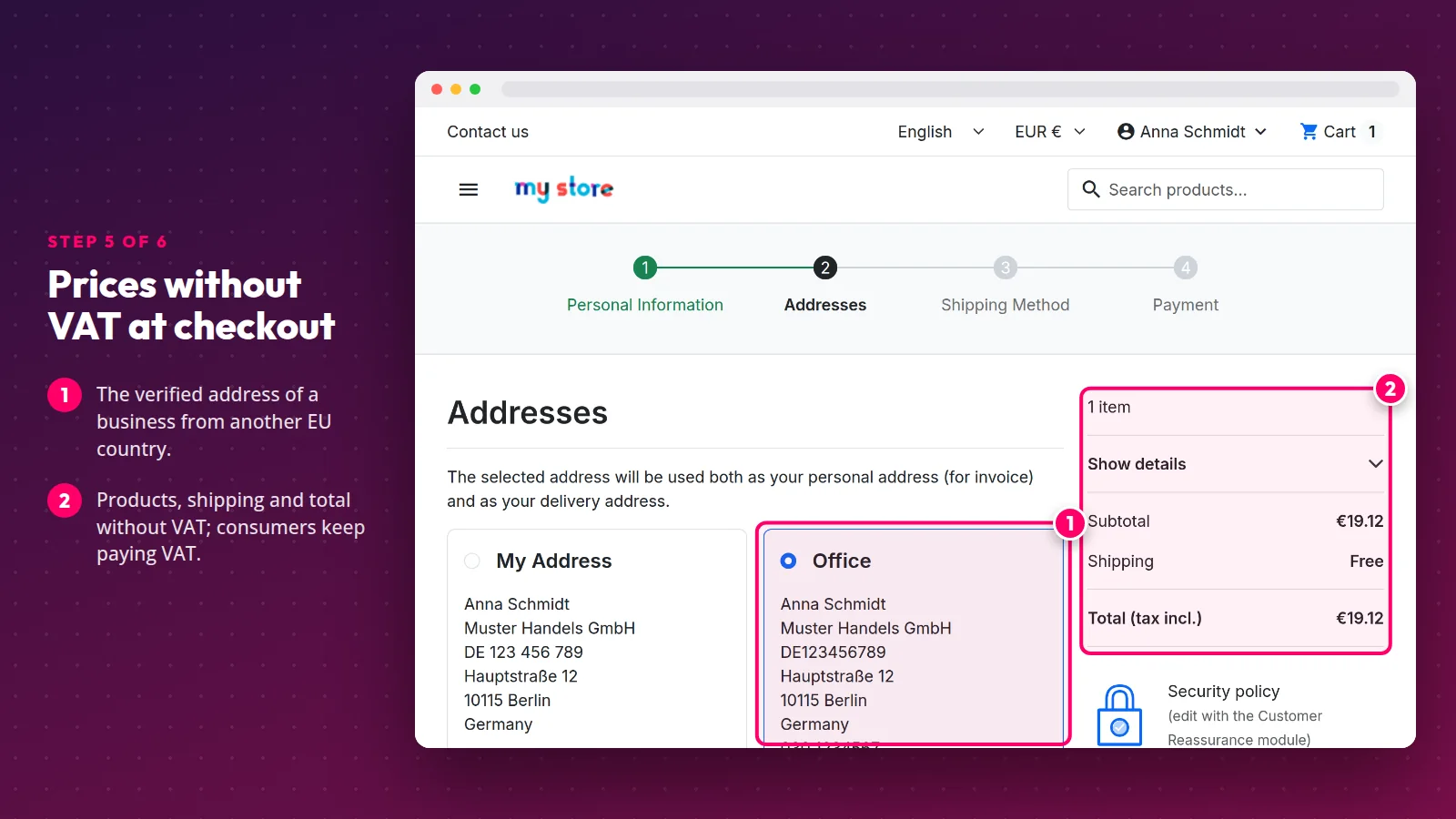
At checkout, a verified business from another EU country sees products, shipping and the total without VAT. Consumers and customers from your own country keep paying VAT. To look at the cart through a specific customer's eyes without knowing their password, use the free Login as Customer module.
Step 6. Check orders, numbers and the log
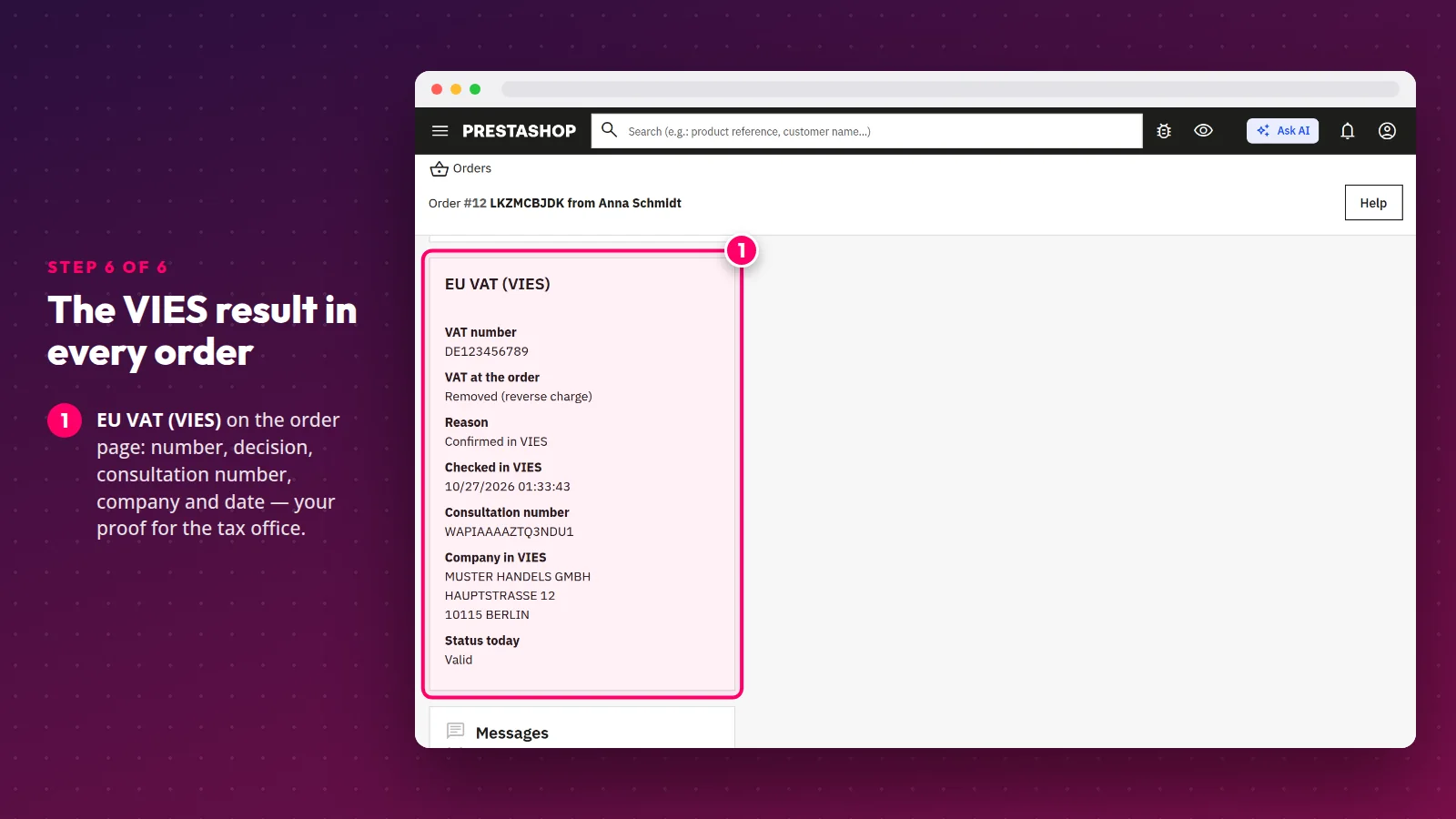
Every order placed with a VAT number keeps the VIES result: the number, the decision, the consultation number, the company name and address and the date of the check. That is your proof for the tax office.
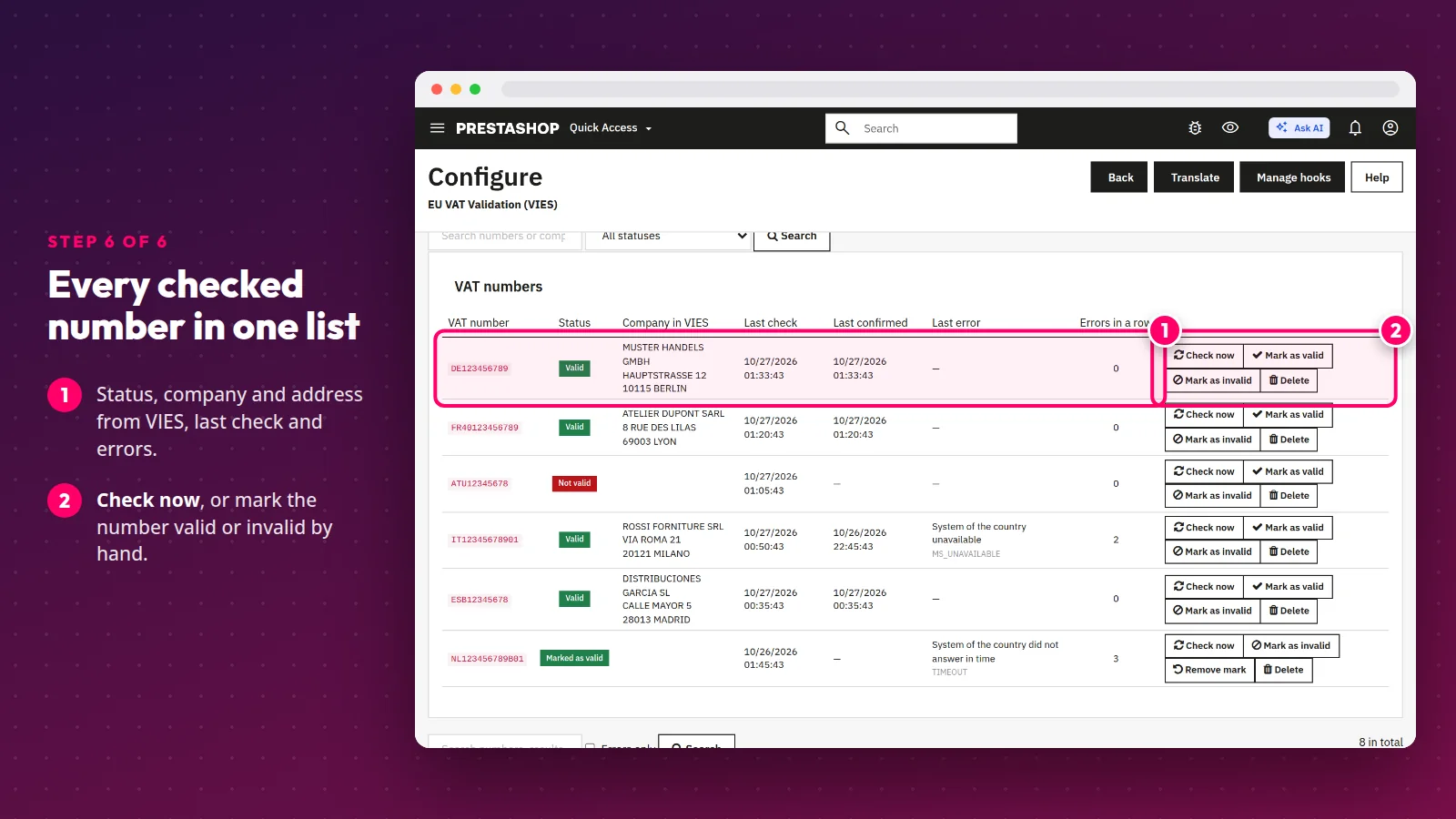
The VAT numbers list shows every checked number with the VIES answer. You can check a number again or mark it by hand — useful when a country's system has been down for days and you verified the company another way.
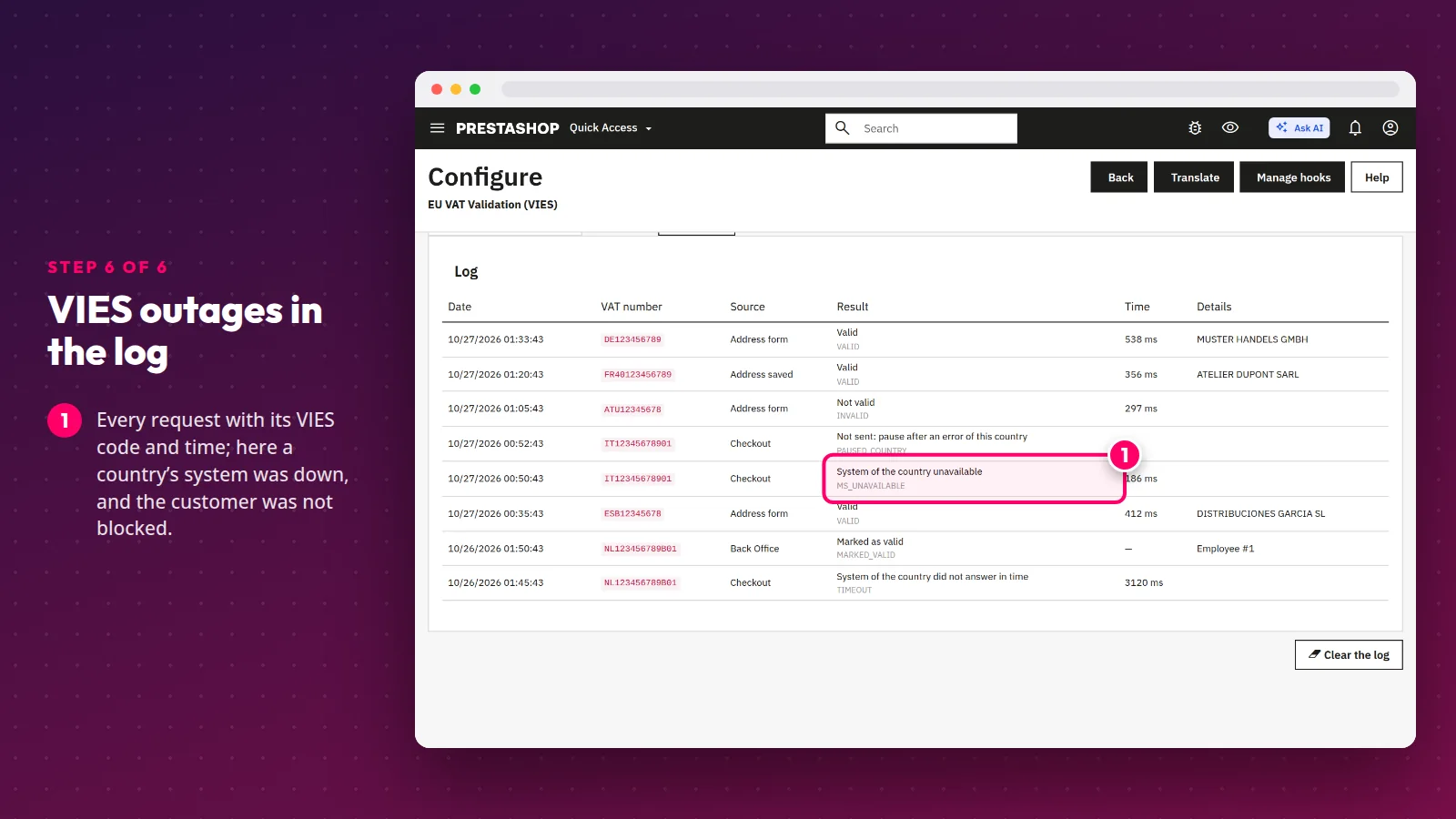
The log records every request with its VIES code and response time, including checks held back by the limits. A VIES outage never blocks the customer; it goes to the log.
Tip: VIES confirms that a number is active, not who typed it. Before you ship a large order, compare the company name and address from VIES with the customer's details on the order.
Common EU VAT mistakes in online shops
- Removing VAT for anyone who types a number. The old
VATNUMBER_MANAGEMENTsetting, or moving customers to a "business" group by hand, does not check that the number is valid. - No VAT number field in the address format. A customer from Germany or France cannot enter it, pays VAT and then asks for a correction.
- No proof of the check. The VIES result with its date and consultation number belongs with the order, not in someone's memory.
- Removing VAT for customers from your own country. The reverse charge for EU sales applies to businesses in other EU countries.
- Ignoring the EUR 10,000 threshold. Above it, consumers from other countries pay the VAT of their country — in PrestaShop you do that with tax rules.
Sorting out the rest of your checkout? Our guide to PrestaShop payment methods helps you choose a gateway, and if your shop runs an older version, read the guide to upgrading PrestaShop. A custom invoice layout or an integration with your accounting software is something we can build as PrestaShop development work.
Sources
- Council Directive 2006/112/EC on the common system of value added tax — Articles 44, 97, 138, 196, 226 and 262.
- Council Implementing Regulation (EU) No 282/2011 — Article 18 (status of the customer and the VAT number).
- Your Europe: cross-border VAT (European Commission).
- One Stop Shop (OSS) and the EUR 10,000 threshold (European Commission).
- VIES VAT number validation and the TEDB database of VAT rates (European Commission).
- Council Directive (EU) 2020/285 — the special scheme for small enterprises from 2025.
- PrestaShop 9.2, Product class — the
VATNUMBER_MANAGEMENTsetting.
Frequently asked questions
Do businesses from other EU countries always buy without VAT?
Only when they give an EU VAT number that is active in VIES. A business without a number, or with an invalid one, is treated as a consumer and pays VAT. That is why the number has to be checked before the shop removes the tax.
What happens when VIES is down?
The module keeps the last answer and, during the grace period (72 hours by default), treats a previously confirmed number as valid. New numbers are checked again after a pause, and every error is written to the log. A VIES outage does not block the order.
Does the reverse charge apply to businesses from my own country?
Not for the sales this guide covers. A customer from your own country pays VAT even with a valid VAT number. In the module this is the "Your country" setting.
Does the module change my tax rules or prices?
No. It only tells PrestaShop to apply 0% for a verified business from another EU country. Tax rules, prices and customer groups stay the same, and after uninstalling the shop charges VAT as before.
Is VAT removed from shipping too?
Yes. For a verified business from another EU country the module removes VAT from products, shipping and gift wrapping, and the invoice and credit slip get the reverse charge note in the language of the order.
Selling to businesses in other EU countries? See the EU VAT Validation (VIES) module or get in touch if you have a question about your shop.
Products in this article
